PoE2 Currency Value Tracker: Why a Mirror's Chaos Price Can Swing 6x While Its Divine Price Never Moves
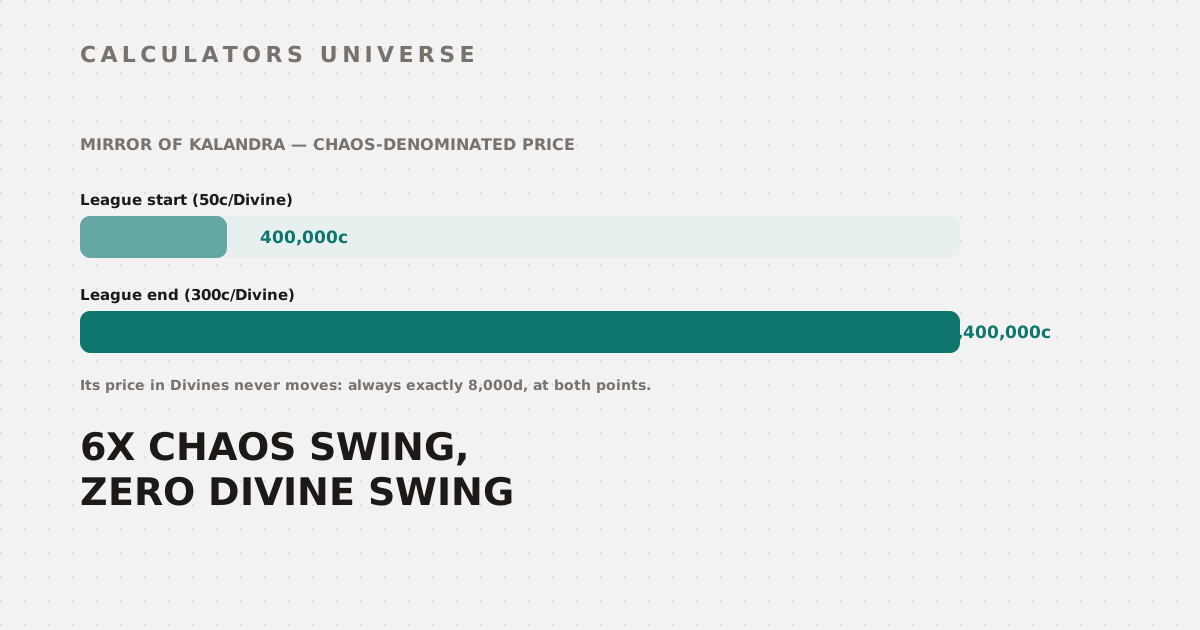
A Mirror of Kalandra always costs exactly 8,000 Divine Orbs — but its Chaos-denominated price can swing from 400,000c to 2,400,000c across a single league. Here's why.
PoE2 Currency Value Tracker: Why a Mirror’s Chaos Price Swings 6x While Its Divine Price Never Moves
A Mirror of Kalandra costs exactly 8,000 Divine Orbs at league start, mid-league, and league end — that ratio doesn’t move. Priced in Chaos Orbs, though, the same Mirror goes from roughly 400,000c at a league-start ratio of 50 chaos per Divine to 2,400,000c once the ratio climbs to 300 chaos per Divine — a 6x swing, with the Mirror never actually changing hands for a different amount of Divines. The PoE2 Currency Value Tracker is built around exactly this distinction, and understanding which currencies move and which stay fixed is the key to reading its value table correctly.
What the Tracker Actually Computes
Every currency in the tool has a Chaos value, but only a handful are actually variables you control — everything else is either a fixed default or derived from those variables:
| Currency | How its Chaos value is set |
|---|---|
| Divine Orb | Directly from your entered Chaos:Divine ratio |
| Exalted Orb | From your input if provided, otherwise a fixed default (2c) |
| Orb of Annulment | From your input if provided, otherwise a fixed default (25c) |
| Mirror of Kalandra | Derived: your Mirror:Divine ratio (default 8,000) × your Divine:Chaos ratio |
| Everything else (Chaos, Regal, Vaal, Alchemy, etc.) | Fixed defaults, never overridden by any input field |
That middle row is the one that matters most: the Mirror’s Chaos price isn’t its own independent input — it’s calculated by multiplying two other numbers together. Change the Divine:Chaos ratio, and the Mirror’s Chaos price moves automatically, without you touching a Mirror-specific field at all.
The Value Table at Two Different Points in a League
Run the same 8,000 Mirror:Divine ratio through two different league-economy states — a league-start ratio of 50 chaos/Divine and a late-league ratio of 300 chaos/Divine:
| Currency | Chaos value @ ratio 50 | Chaos value @ ratio 300 | Divine value @ ratio 50 | Divine value @ ratio 300 |
|---|---|---|---|---|
| Mirror of Kalandra | 400,000c | 2,400,000c | 8,000d | 8,000d |
| Divine Orb | 50c | 300c | 1d | 1d |
| Exalted Orb | 2c | 2c | 0.04d | 0.0067d |
| Chaos Orb | 1c | 1c | 0.02d | 0.0033d |
Two completely different kinds of movement are happening in this table at once:
- Mirror’s Chaos value moves, its Divine value doesn’t — because Mirror is defined as a fixed multiple of Divines, its price in Divines is untouched by the ratio shift, but its Chaos price scales directly with whatever the Divine:Chaos ratio happens to be.
- Exalted and Chaos’s Chaos values don’t move, their Divine values shrink — their Chaos price stays at the tool’s fixed defaults, but because Divines got more expensive in Chaos terms, the same fixed Chaos amount now represents a smaller fraction of a Divine.
Neither of these is the currency itself becoming more or less useful — it’s the same underlying mechanic (Divines getting more expensive in Chaos as a league progresses) expressing itself in opposite directions depending on which side of the ratio a currency is defined on.
Why This Matters for Holding vs. Converting
This is the mechanical explanation behind the general “convert early, hold late” advice players give: if you’re holding a currency whose Chaos price is fixed (nearly everything except Mirror), its Divine-denominated value only ever goes down as the league’s Chaos:Divine ratio rises — because you’re measuring a constant against a moving target. Divines themselves are the one thing in the table whose Divine value is trivially always 1 — converting Chaos into Divines early, before the ratio climbs, locks in more Divines per Chaos than waiting does.
The Trade Note Thresholds
Once an amount is converted to its Chaos equivalent, the tracker gives one of four standard trading suggestions based on total value:
| Chaos equivalent | Suggested action |
|---|---|
| Under 5c | Use in-game trade chat for a quick deal |
| 5c – 49c | List on the trade site or offer in trade chat |
| 50c – 199c | Worth listing on pathofexile.com/trade2 for bulk buyers |
| 200c and above | High value — price carefully, premium listings attract serious buyers |
A stack of 30 Exalted Orbs at the fixed 2c default values out to 60 Chaos-equivalent — comfortably inside the “worth listing on the trade site” bracket rather than something to just offer in trade chat.
How to Use the PoE2 Currency Value Tracker
- Open the PoE2 Currency Value Tracker.
- Enter the current Chaos:Divine ratio you’re seeing on the trade site — this single number drives most of the table.
- Optionally override the Exalted, Annulment, or Mirror:Divine ratios if you have more current data than the defaults.
- Select your source and target currency and amount to convert.
- Read the full value table, sorted highest to lowest, and check the trade note for guidance on where to list or trade your amount.
Related Calculators
Plan your Atlas passive tree and endgame strategy with the PoE2 Atlas Strategy Tool, or check craft and drop odds with the Luck Percentile Calculator and Gacha Pity Calculator — both model the same underlying probability math that governs PoE2’s crafting RNG. If you play other ARPGs too, compare grind timelines with the Elden Ring Level Calculator and Diablo 4 Paragon Grind Calculator.
Frequently Asked Questions
Why does the calculator ask for a Mirror:Divine ratio instead of a Mirror:Chaos ratio directly?
Because that’s how Mirrors are actually priced and traded in practice — sellers quote Mirror prices in Divines (commonly “8,000 Divines”), not in raw Chaos, since a Chaos-denominated Mirror price would be an unwieldy six- or seven-digit number that changes every time the Divine ratio shifts. Deriving the Chaos value from the Divine ratio keeps the Mirror price stable and realistic rather than needing a separate, hard-to-source direct quote.
If Exalted Orbs are always 2 chaos by default, does that mean they’re immune to league economy shifts?
Only in the sense that this calculator uses a fixed default unless you override it — in the actual game economy, Exalted Orb Chaos prices do drift somewhat league to league too. The calculator’s Exalted, Annulment, and Mirror-ratio override fields exist specifically so you can correct the defaults with live trade site data whenever the fixed values stop matching reality.
Is it always better to convert Chaos into Divines early in a league?
As a general pattern, yes — since Divines get more expensive in Chaos terms as a league progresses, converting earlier means more Divines per Chaos spent. The exception is if you have an immediate use for Chaos-denominated purchases (most sub-1-Divine items are priced in Chaos), in which case holding Chaos briefly for planned spending makes more sense than converting speculatively.
Why does the value table sort currencies by Chaos value instead of Divine value?
Chaos Orbs are the baseline unit (fixed at exactly 1c by definition) that every other currency’s value is expressed relative to, so sorting by Chaos value produces a stable ranking that doesn’t reshuffle every time the Divine ratio changes. Divine value, in contrast, is a moving target for every currency except Divine itself, since it’s calculated by dividing each currency’s fixed Chaos price by whatever Divine ratio is currently entered.
Does Gold behave differently from the other currencies in this calculator?
Yes — Gold is a vendor-only currency in PoE2, used for NPC shop rerolls and atlas passive points, and it cannot be traded directly between players on the trade site at all. The calculator includes it at a reference rate (roughly 1,000 Gold per Chaos) purely for context; treat any Gold conversion as informational rather than something you can actually execute as a player-to-player trade.
The value table isn’t really eighteen independent prices — it’s one variable (your Chaos:Divine ratio), one derived currency (Mirror), and a set of fixed defaults, all interacting to produce numbers that look like they’re all moving independently when only one of them actually is.
External Resources
- PoE2 Trade Site — official bulk currency exchange and live trade listings
- PoE2 Wiki — community-maintained reference for currency mechanics and crafting