Robux to Currency Calculator: What the 30,000 Threshold Actually Checks
29,999 earned Robux and 30,000 earned Robux are worth almost the same $105 — but only one of them can actually be cashed out. The eligibility check is a Robux count, not a dollar value.
Robux to Currency Calculator: What the 30,000 Threshold Actually Checks
29,999 earned Robux and 30,000 earned Robux convert to almost exactly the same $105 — but only one of those two balances can actually be exchanged for real money. The Developer Exchange minimum is a hard cutoff on the raw Robux count, not on the dollar value it represents. The Robux to Currency Calculator checks that threshold directly, alongside a full gross-to-net funnel most Robux-to-USD tools skip entirely: the platform fee, the DevEx conversion, a currency exchange step, and an income tax deduction. Here’s the complete math.
The Full Conversion Funnel
The calculator runs every Robux amount through five sequential steps:
1. Actual Robux  = Amount × (1 − 30%)          [only if this is a market sale]
2. Gross USD     = Actual Robux × $0.0035       [DevEx rate]
3. Converted     = Gross USD × FX rate           [target currency]
4. Tax deduction = Converted × Income Tax Rate
5. Take-home     = Converted − Tax deduction
Step 1 only applies if you’re converting Robux earned from a marketplace sale (game passes, developer products) — Robux you already hold outright skip the 30% platform cut entirely.
The 30,000 Threshold Is a Count, Not a Value
DevEx eligibility checks whether your earned Robux balance is at least 30,000 — full stop. It doesn’t matter that 29,999 Robux and 30,000 Robux are worth almost identical amounts once converted:
| Earned Robux | Converted value (USD, no tax) | DevEx eligible? |
|---|---|---|
| 29,999 | $105.00 | No |
| 30,000 | $105.00 | Yes |
A single Robux is the entire difference between “not eligible” and “eligible.” If you’re close to the threshold, the calculator’s eligibility flag is worth checking on its own — the dollar figure next to it can look identical on both sides of the line.
The Same Robux, Four Different Numbers
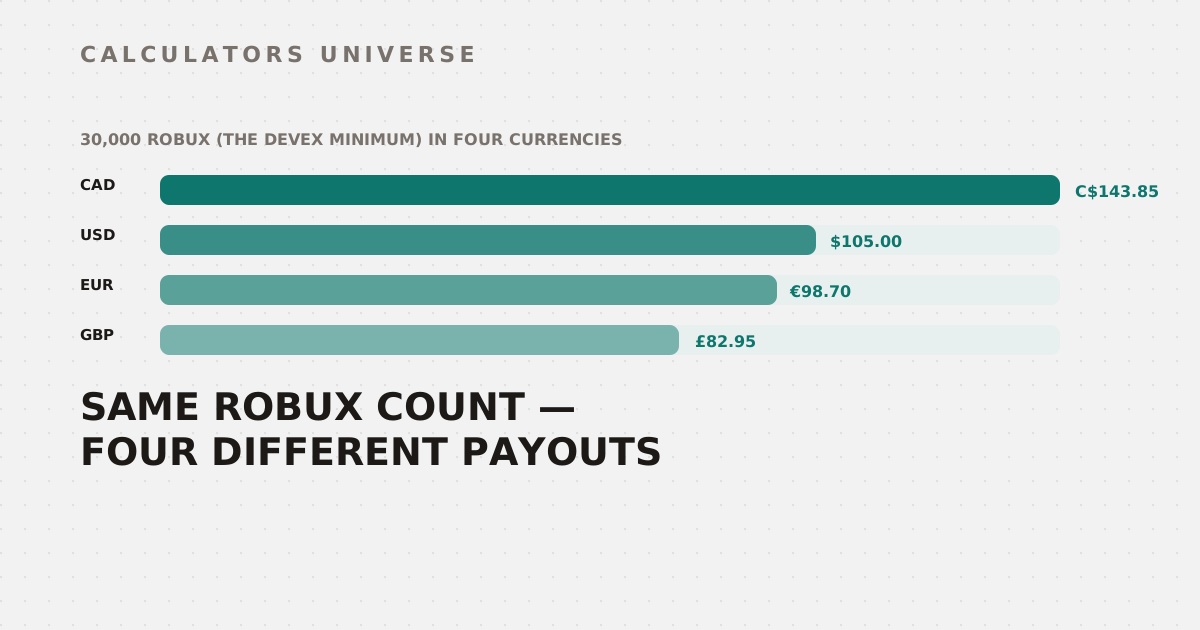
Converting the exact 30,000-Robux minimum (no market fee, no tax) into each supported currency shows how much the FX step alone moves the final number:
| Currency | Converted value at 30,000 Robux |
|---|---|
| CAD | C$143.85 |
| USD | $105.00 |
| EUR | €98.70 |
| GBP | £82.95 |
The Robux amount and the DevEx rate never change across this table — only the currency multiplier does. Reading a Robux payout in the “wrong” currency for your own location is an easy way to misjudge whether a payout is actually worth cashing out.
A Full Worked Example
Take 500,000 Robux earned from marketplace sales, converting to GBP, with a 25% income tax set-aside:
| Step | Calculation | Result |
|---|---|---|
| Actual Robux after 30% platform fee | 500,000 × 0.70 | 350,000 |
| Gross USD | 350,000 × $0.0035 | $1,225.00 |
| Converted to GBP | $1,225.00 × 0.79 | £967.75 |
| Tax deduction (25%) | £967.75 × 0.25 | £241.94 |
| Take-home | £967.75 − £241.94 | £725.81 |
Against the undiscounted face value of that 500,000 Robux converted straight to GBP with no fee or tax at all (£1,382.50), the final £725.81 take-home is just 52.5% of it — the platform fee and the tax set-aside compound on top of each other rather than just subtracting once.
How Much the Tax Rate Alone Moves Your Take-Home
Using the same 500,000-Robux marketplace sale converted to USD, only changing the income tax rate:
| Tax rate | Take-home |
|---|---|
| 0% | $1,225.00 |
| 15% | $1,041.25 |
| 25% | $918.75 |
| 30% | $857.50 |
The gap between assuming 0% tax and setting aside a realistic 25–30% is $300–370 on this specific payout — exactly the kind of gap that turns an optimistic “I made $1,225” into a much smaller real number once the money actually needs to be reported as income.
How to Use the Robux to Currency Calculator
- Open the Robux to Currency Calculator.
- Enter your Robux amount and toggle whether it came from a marketplace sale (applies the 30% fee) or is Robux you already hold.
- Select your target currency and your estimated income tax rate.
- Check the eligibility flag if you’re near the 30,000 Robux minimum — don’t rely on the dollar figure alone to judge it.
- Read the full breakdown: gross USD, converted amount, tax deduction, and final take-home.
Related Calculators
Compare this payout against another platform’s in-game currency exchange with the Shark Card ROI Calculator, or audit your own game’s monetization efficiency with the Currency Value Tool. If you’re weighing creator income against other investments, check real estate returns with the Property ROI Calculator, and if your game uses gacha-style RNG, verify your pity system is fair with the Gacha Pity Calculator. For the full purchase-rate vs. cash-out picture, see Robux to USD: The Real Value of Roblox’s Currency, and estimate your game’s total earnings with the Roblox Game Revenue Estimator.
Frequently Asked Questions
Why does GBP show a smaller number than EUR for the same Robux amount?
Because the calculator’s FX rates reflect each currency’s actual exchange value against the US dollar, not the size of the Robux amount — GBP’s rate (0.79) is lower than EUR’s (0.94) in this tool because one British pound is worth more than one euro, so fewer pounds are needed to represent the same USD amount.
Is the 30,000 Robux DevEx minimum about the Robux count or the dollar value?
It’s strictly a Robux count — the calculator’s eligibility check compares your raw Robux amount against 30,000, regardless of what that converts to in any currency. 29,999 Robux and 30,000 Robux convert to almost the same dollar figure, but only the second one clears the threshold.
Does the income tax rate in this calculator reflect what I actually owe?
No — it’s a planning estimate based on whatever percentage you enter, not a calculation of your actual tax liability, which depends on your total income, filing status, local tax law, and jurisdiction. Treat the tax deduction figure as a budgeting tool for setting aside funds, not as a substitute for actual tax guidance.
Does the 30% platform fee apply to Robux from Premium Payouts?
No — the 30% marketplace fee in this calculator applies specifically to Robux earned from marketplace sales like game passes and developer products. If you’re converting Robux from a source that didn’t go through a marketplace transaction, leave the market sale toggle off so the fee isn’t applied to Robux that never had it deducted in the first place.
Is the $0.0035 DevEx rate this calculator uses still current?
This is the standard rate that’s been in place for a meaningful stretch of Roblox’s Developer Exchange program, but Roblox has adjusted DevEx rates before and can do so again — always cross-check the figure against Roblox’s official DevEx documentation before making a real financial decision based on this calculator’s output, especially if you’re converting a large Robux balance.
Every payout is really four separate haircuts stacked on top of each other — the platform fee, the DevEx rate, the currency you’re paid in, and the tax you owe on it — and none of the first three tell you anything about the fourth.
External Resources
- Roblox DevEx Official Documentation — official Developer Exchange program rules and eligibility requirements
- IRS Self-Employed Tax Information — official U.S. guidance on reporting self-employment income