GPU Upgrade Payback Calculator: When Does a New Graphics Card Actually Pay for Itself?
A data-driven framework for deciding whether a GPU upgrade is worth it right now — covering cost-per-FPS, resale value decay, electricity cost, and the bottleneck risk that wastes an upgrade before it starts.
Is Your GPU Upgrade Actually Worth It, or Just a Habit?
Every GPU launch triggers the same reflex: check the benchmarks, check your bank balance, and ask “should I upgrade?” Most people answer that question with vibes — a YouTube thumbnail, a friend’s recommendation, a vague sense that their card is “getting old.” Almost nobody answers it with math.
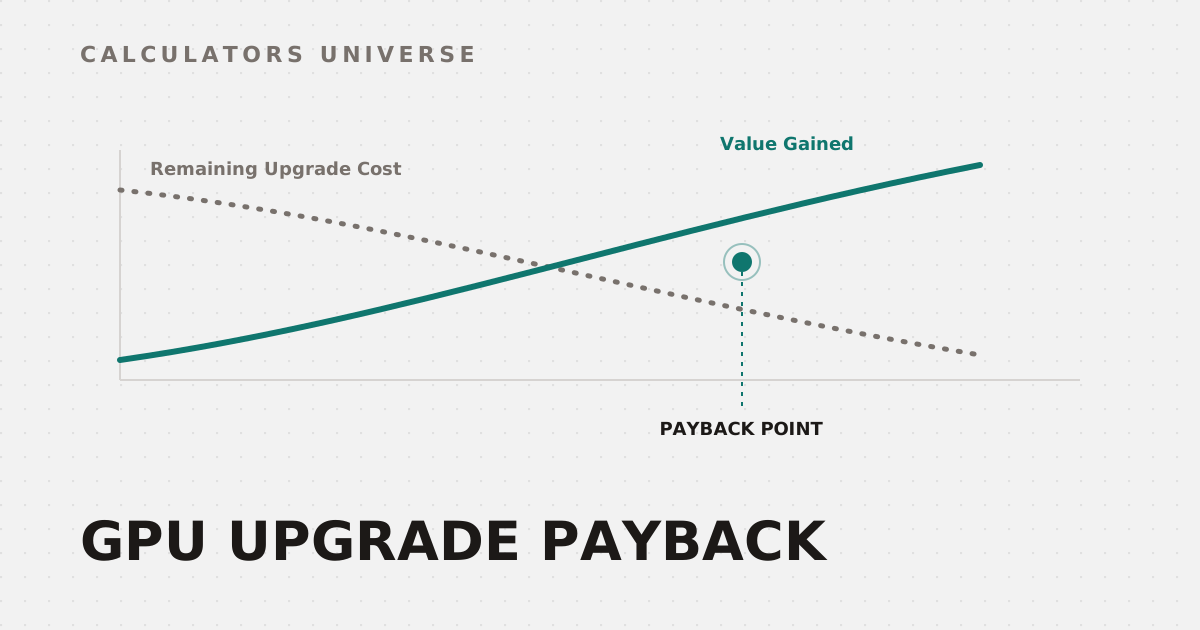
This is a shame, because the math is not complicated. A GPU upgrade only “pays for itself” when the value you gain (more FPS, better resale position, lower running cost) exceeds the net cash you put in (upgrade price minus what you sold your old card for) inside the time you’ll actually own it. Below is the full framework, the real numbers behind it, and the calculators that do this instantly so you don’t have to run spreadsheets every launch cycle.
Step 1: Net Cost, Not Sticker Price
The number that matters is never the new GPU’s price tag — it’s new card price minus your old card’s resale value. A $600 GPU that replaces a card you can sell for $250 has a real cost of $350, not $600. This single adjustment is where most upgrade-worth-it debates go wrong.
Resale value itself decays predictably. Across the used GPU market, cards typically retain the following share of their original MSRP:
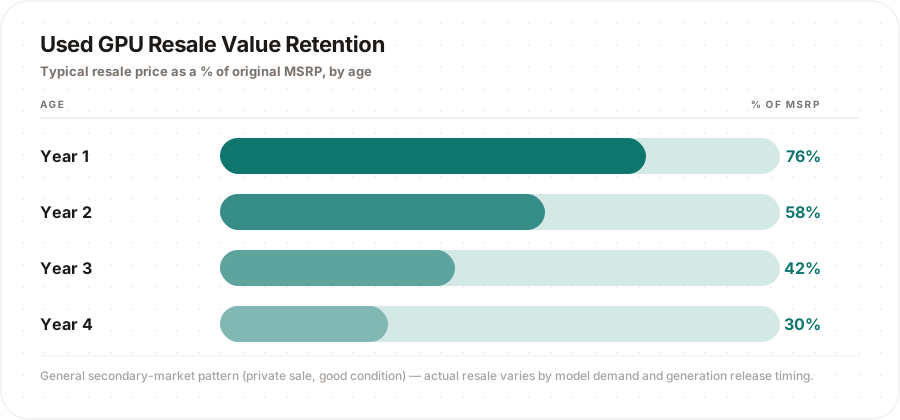
The takeaway: selling at the 1–2 year mark, right before the depreciation curve steepens, recovers meaningfully more cash than waiting until year 3 or 4. Our GPU Resale Value Estimator plugs in your specific model, age, condition, and region to give you a real private-sale range and trade-in floor instead of a generic curve.
Step 2: Cost Per Frame, Not Just “More FPS”
“20% more FPS” means nothing on its own — it means something once you divide it by what you paid to get it. A $700 upgrade that adds 15 FPS at 1440p costs roughly $46 per extra frame. A $400 upgrade that adds 20 FPS costs $20 per extra frame — objectively the better deal, even though the raw FPS number is smaller.
This is exactly the calculation our GPU Upgrade Worth It? Calculator runs for you: enter your current and target GPU and it returns the FPS gain percentage, net cost after resale, dollar-per-frame efficiency, and a direct verdict. For a full build-level view — factoring in ownership length, monitor refresh cap, and PC-vs-console tradeoffs — the PC Upgrade ROI Calculator extends the same math across your whole rig, not just the GPU line item.
Step 3: Don’t Upgrade Into a Bottleneck
Here’s the upgrade mistake that wastes the most money: buying a significantly faster GPU while keeping an aging CPU, then getting a fraction of the expected FPS gain because the CPU can’t feed it fast enough. This is especially relevant heading into the next GPU generation, where raw horsepower jumps tend to outpace CPU improvements.
Before spending on a GPU, check your CPU pairing with the RTX 60-Series Bottleneck Calculator — it compares your CPU against next-gen GPU tiers so you don’t discover the mismatch after the return window closes.
Step 4: Running Cost Is Part of the Payback Math Too
A faster GPU often draws meaningfully more power under load, and that operating cost compounds over the years you own it — it’s real money that offsets your “value gained” side of the ledger. Our Gaming Electricity Cost Calculator breaks this down by CPU, GPU, monitor count, and local electricity rate so you can see the actual yearly delta between your current card and the one you’re considering, not just the purchase price difference.
Step 5: Check Whether You Even Need the Upgrade Yet
Modern upscaling technology has quietly extended the useful life of older GPUs by a full generation in many cases. Before spending anything, run your target resolution and monitor through the DLSS 5 vs. Native Quality Score Calculator — if your current card can hit your target frame rate at an acceptable quality tier using DLSS or FSR, the “upgrade” that pays back fastest might be a settings change, not a purchase.
Putting It Together: A Simple Payback Checklist
| Question | Tool |
|---|---|
| What’s my old card actually worth right now? | GPU Resale Value Estimator |
| Is the FPS gain worth the net cost? | GPU Upgrade Worth It? Calculator |
| How does this play out across my whole PC and ownership period? | PC Upgrade ROI Calculator |
| Will my CPU bottleneck the new GPU? | RTX 60-Series Bottleneck Calculator |
| What will the extra power draw cost me per year? | Gaming Electricity Cost Calculator |
| Can upscaling get me there without buying anything? | DLSS 5 vs. Native Quality Score |
Frequently Asked Questions
How often should you upgrade your GPU?
Most cost-effective upgrade cycles land every 3–4 GPU generations (roughly 3–5 years), which is also where resale value has already dropped enough that holding on longer stops making financial sense — see the depreciation curve above.
Is it better to upgrade the GPU or the CPU first?
Whichever one is currently the bottleneck for your target resolution and settings. Pairing a new GPU with an old CPU is the single most common way to waste an upgrade — check this before buying, not after.
Does selling my old GPU actually matter that much?
Yes. Selling within the first 12–18 months typically recovers 55–75% of the original price; waiting past 3 years usually recovers under 40%. That difference is often larger than a generation’s worth of FPS improvement.
Can I skip upgrading with DLSS or FSR instead?
Often, yes — for one more generation. Upscaling won’t beat genuinely running out of VRAM or raw compute, but it reliably buys another 1–2 years of acceptable performance on the same card for many games and resolutions.
Does electricity cost really factor into an upgrade decision?
It’s a smaller factor than purchase price and resale value, but a higher-TDP card run for years does add up — factor it in for an honest total-cost comparison rather than ignoring it.
Related Calculators
For the full upgrade-decision toolkit, start with the GPU Upgrade Worth It? Calculator and GPU Resale Value Estimator, then check total build impact with the PC Upgrade ROI Calculator, rule out a CPU bottleneck with the RTX 60-Series Bottleneck Calculator, and confirm the running-cost side with the Gaming Electricity Cost Calculator and DLSS 5 vs. Native Quality Score Calculator.
External Resources
- NVIDIA GeForce Graphics Cards — official specifications for current and past GPU generations
- Steam Hardware & Software Survey — Valve’s monthly snapshot of what GPUs the broader PC gaming market is actually running, useful context for how fast the “average” rig is really moving