PSU Wattage Calculator Math: How Much Power Does Your PC Actually Need?
Adding up your components' wattage isn't enough. Transient spikes, the efficiency curve, and a real connector safety issue all change what PSU you actually need.
PSU Wattage Calculator Math: How Much Power Do You Actually Need?
Adding up your CPU’s and GPU’s rated wattage and buying a PSU that covers the total is the most common PSU-sizing mistake — and it can leave you with random shutdowns under load, a noisy, overheating unit, or in one well-documented case, a genuinely melted power connector. Here’s the real math behind each of those three problems.
The Basic Math: Adding Up Real Draw
Start with actual component power draw — CPU, GPU, storage, fans, and everything else — rather than guessing from a single “system requirement” number on a box. Get an exact wattage figure and PSU recommendation for your specific build, including ATX 3.0 and GPU transient spike headroom, with the PSU Wattage Calculator, and see the real electricity cost of running that build with the PC Power Consumption Calculator.
Why “Enough” Isn’t Enough: Transient Power Spikes
Modern high-end GPUs don’t draw power at a steady rate — they pull sharp, microsecond-to-millisecond transient spikes that can momentarily hit roughly double their rated power draw. A PSU without enough headroom for these spikes can trip its own overcurrent protection and shut the whole system down, even though the average draw was well within spec. This is exactly why component manufacturers recommend PSUs well above a build’s calculated total: a general guideline is 20–30% headroom above realistic peak load, rising to 30–50% for overclocked or high-power CPU/GPU combinations. Check your CPU and GPU’s real combined heat and power output — a Ryzen 9950X paired with an RTX 5090 alone generates roughly 775W — with the CPU & GPU Cooling TDP Calculator.
The Efficiency Sweet Spot: Why Bigger Isn’t Wasteful
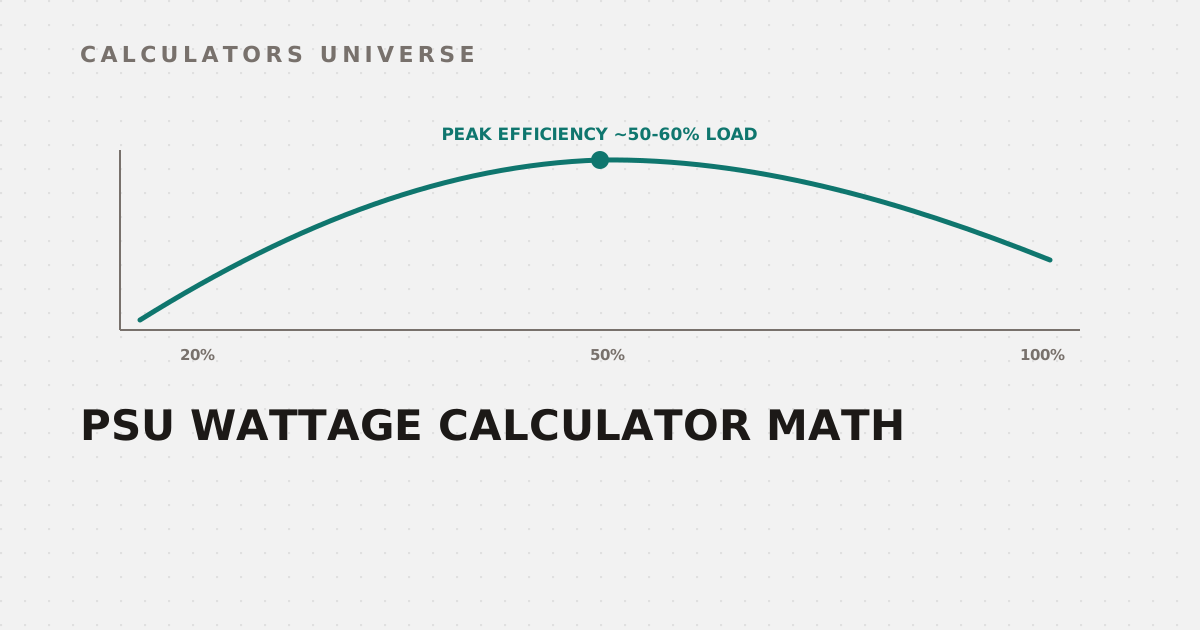
Every PSU has an efficiency curve, and it peaks in the middle, not at either extreme.
80 PLUS certification tests exactly these three load points — 20%, 50%, and 100%
80 PLUS certification tests efficiency at 20%, 50%, and 100% load, and virtually every tier peaks around the 50–60% mark — a Titanium-rated unit hits roughly 94% efficiency at 50% load. The practical takeaway: sizing a PSU to run your typical draw at around half its rated capacity keeps it in its most efficient, coolest, and quietest operating range — which is why “bigger than strictly necessary” is a genuine reliability and noise choice, not wasted money. Check your system’s real idle-vs-load power draw with the PC Idle vs Load Power Calculator, and compare GPU efficiency directly with the GPU Performance Per Watt Calculator.
The Real Safety Issue: 12VHPWR/12V-2x6 Connector Melting
This isn’t a theoretical risk — it’s a well-documented hardware safety issue. The RTX 4090’s 16-pin 12VHPWR connector carries 40–50A through multiple thin pins, and if the connector isn’t fully seated (or the cable is bent sharply near the plug), a few pins can end up making poor contact. That uneven contact concentrates resistance — and therefore heat — at just one or two pins instead of spreading the load evenly, which is enough to soften or melt the surrounding plastic housing.
A single loose pin can concentrate enough resistance to soften nearby plastic — always push until it clicks
PCI-SIG’s revised 12V-2x6 connector (raising rated capacity from 600W to 660W) largely resolved the original RTX 4090 failures, but reports of similar overheating have continued to surface with the RTX 5090 as power limits push toward 575–600W and beyond — this remains an active, evolving safety concern, not a fully closed case. Check exactly which cable or adapter your specific PSU and GPU combination needs — and confirm ATX 3.0 compatibility — with the ATX 3.0 / 12VHPWR Cable Advisor.
Frequently Asked Questions
Why do manufacturers recommend PSUs so much bigger than my parts need?
Two real reasons: transient power spikes can briefly double a GPU’s rated draw, and PSUs run most efficiently, coolest, and quietest around 50–60% of their rated capacity — both push the recommended size well above your components’ simple wattage total.
Is the 12VHPWR melting issue actually fixed?
Partially — the revised 12V-2x6 connector resolved most of the original RTX 4090 failures, but similar overheating reports have continued to surface on the RTX 5090 as power draw pushes toward 600W, so full seating and cable care still matter.
What does the 80 PLUS rating actually test?
Efficiency at three specific load points — 20%, 50%, and 100% of the PSU’s rated capacity — with every certification tier peaking around the 50–60% mark, which is why that load range is the efficiency sweet spot in practice.
How much PSU headroom do I actually need?
A common guideline is 20–30% above your realistic peak load for a standard build, rising to 30–50% for overclocked systems or high-transient-spike GPUs.
Does a partially seated GPU power connector really cause overheating?
Yes — uneven pin contact concentrates resistance (and therefore heat) at just one or two pins instead of spreading the load evenly, which is the leading documented cause behind 12VHPWR melting reports.
Related Calculators
Start with the PSU Wattage Calculator and check real running costs with the PC Power Consumption Calculator and PC Idle vs Load Power Calculator. Confirm your cooling matches your power draw with the CPU & GPU Cooling TDP Calculator, compare efficiency with the GPU Performance Per Watt Calculator, and check your power connector safety with the ATX 3.0 / 12VHPWR Cable Advisor.
External Resources
- 80 PLUS Certification Program — CLEAResult — the official PSU efficiency certification program and database
- Self-destructing graphics cards: Why power connectors are melting — Tom’s Hardware — detailed technical investigation into the 12VHPWR/12V-2x6 failures