PC Case GPU Clearance: How 66mm Disappears Before the GPU Even Enters the Case
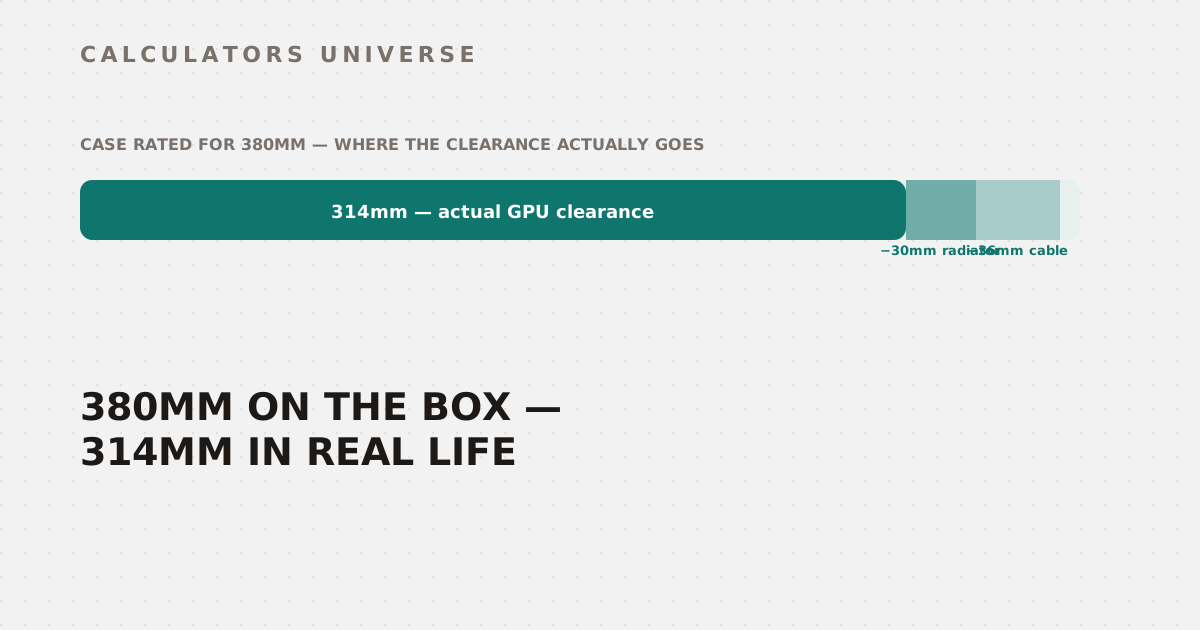
A case rated for 380mm of GPU clearance only has 314mm left once a front radiator and an ATX 3.0 cable are accounted for — enough to turn a 'fits' into a 26mm overhang.
PC Case GPU Clearance: How 66mm Disappears Before the GPU Even Enters the Case
A case advertised with 380mm of GPU clearance only has 314mm left for the actual graphics card once a front-mounted radiator (−30mm) and an ATX 3.0 power cable’s bend radius (−36mm) are subtracted — 66mm gone before the GPU’s own length even enters the calculation. Add a 340mm card into that 314mm of real space, and what looked like a comfortable 40mm of margin on the box becomes a 26mm overhang. The PC Case GPU Clearance & Fit Calculator runs this exact subtraction — here’s the full math and where the real risk tiers sit.
The Effective Clearance Formula
Effective clearance = Case's rated max GPU length
                       − 30mm  (if a front radiator + fans is installed)
                       − 36mm  (if an ATX 3.0 / 12VHPWR cable needs its bend radius)

Fit margin = Effective clearance − GPU length
Both deductions are conditional — only front-mounted radiators eat into GPU space (a top or rear radiator doesn’t), and only ATX 3.0-generation cards need the 36mm cable allowance. Skip both, and effective clearance equals the case’s rated number exactly.
The Four Risk Tiers
Once a fit margin is calculated, it’s classified into one of four outcomes:
| Fit margin | Verdict | Risk level |
|---|---|---|
| Negative (GPU overhangs) | Does not fit | Critical |
| 0mm – 9mm | Fits very tightly | High |
| 10mm – 29mm | Fits with minimal clearance | Medium |
| 30mm or more | Fits comfortably | Low |
Slot width (the card’s thickness) is checked separately from length. A card thicker than 3.0 slots fails the fit check even with plenty of length margin — but the calculator treats that as a distinctly different, softer failure than a true length overhang.
Six Worked Examples Across Every Tier
| Scenario | Effective clearance | Fit margin | Headroom | Verdict |
|---|---|---|---|---|
| RTX 5090 (340mm, 3.5 slots) in a 380mm case, radiator + ATX3 cable | 314mm | −26mm | — | Does not fit (critical) |
| RTX 4090 (336mm, 3.0 slots) in a 370mm case, ATX3 cable only | 334mm | −2mm | — | Does not fit (critical) |
| RTX 4090 (336mm, 3.0 slots) in a 380mm case, ATX3 cable only | 344mm | +8mm | 2% | Fits very tightly (high) |
| RTX 4070 FE (244mm, 2.0 slots) in a 270mm case, no allowances | 270mm | +26mm | 11% | Fits with minimal clearance (medium) |
| RTX 4070 FE (244mm, 2.0 slots) in a 320mm case, no allowances | 320mm | +76mm | 31% | Fits comfortably (low) |
| A 300mm, 3.5-slot card in a 400mm case, no allowances | 400mm | +100mm | 33% | Length OK, slot width exceeds rating (high) |
The second example is worth sitting with: a 336mm GPU in a case rated for 370mm looks like a 34mm buffer on paper. Subtract only the ATX 3.0 cable allowance — no radiator even involved — and that “comfortable” 34mm becomes a 2mm overhang. The case’s rated number and the card’s rated length were both accurate; the cable’s physical bend radius was the variable nobody put on the spec sheet.
Why a Slot-Width Failure Gets a Softer Verdict
The last example in that table — a thick card that’s otherwise short enough — returns “Length OK, but slot width exceeds case rating” rated as “high” risk rather than the “critical” rating a true length overhang gets. That’s a deliberate distinction: slot-width ratings are often conservative manufacturer numbers, and a case’s side panel or PCIe bracket sometimes has a little real-world flex that a hard length overhang never does. A card that’s physically too long has nowhere to go; a card that’s slightly too thick sometimes still closes the case, which is why the calculator flags it as a warning to double-check rather than a guaranteed failure.
How to Use the PC Case GPU Clearance Calculator
- Open the PC Case GPU Clearance & Fit Calculator.
- Enter your GPU’s exact length and slot thickness from the manufacturer’s product page — partner cards can run 20–50mm longer than reference designs.
- Enter your case’s official maximum GPU clearance.
- Toggle whether you’re running a front-mounted radiator and/or an ATX 3.0/12VHPWR power cable.
- Read the fit margin, headroom percentage, and risk tier — treat anything under 10mm of margin as a real installation risk, not just a technicality.
Related Calculators
Pick the right cooler for your case and CPU heat output with the AIO vs Air Cooler Decision Calculator, and size your power supply correctly — including ATX 3.0 cable requirements — with the PSU Wattage Calculator. Split your total build budget across GPU, case, and cooling with the PC Build Budget Planner, plan cable routing once your GPU and case are locked in with the PC Cable Length & Management Calculator, and confirm your CPU can actually keep up with the GPU you’re fitting in with the CPU & GPU Bottleneck Calculator.
Frequently Asked Questions
Why did my GPU not fit even though the case’s rated clearance was longer than my card?
The case’s rated maximum GPU length is usually measured without a front-mounted radiator installed and without accounting for an ATX 3.0 power cable’s bend radius — both are common, hidden reductions. A 34mm buffer on paper can shrink to a 2mm overhang once just the cable allowance is subtracted, which is exactly what happened in one of the worked examples above.
Is a negative fit margin always a hard dealbreaker?
Yes, for length — a negative margin means the GPU is physically longer than the available space, and no amount of manufacturer rating flexibility changes that. Slot-width overages are treated differently and more leniently, since case panel flex and conservative bracket ratings sometimes allow a slightly-too-thick card to still close, but a true length overhang has no equivalent flex to rely on.
How much clearance is actually “safe” versus just technically fitting?
Anything under 10mm of margin is classified as high risk, since power cables, anti-sag brackets, and natural GPU sag over time can all eat into that space after the fact. Aiming for at least 30mm of margin gives genuinely comfortable installation room and better airflow around the card, not just a card that closes the side panel on day one.
Does a top-mounted or rear radiator affect GPU clearance the same way a front radiator does?
No — only a front-mounted radiator sits in the same physical space the GPU’s length occupies, which is why this calculator’s 30mm allowance only applies when a front radiator is selected. Top-mounted and rear-mounted radiators occupy different case regions and don’t compete with GPU length in the same way.
Why does the ATX 3.0 cable need 36mm specifically?
That figure reflects the minimum safe bend radius for a 12VHPWR/12V-2x6 connector — bending the cable tighter than that risks uneven pin contact, which concentrates resistance (and heat) at individual pins and has been linked to connector overheating on high-wattage cards. The 36mm allowance exists to keep the cable routed safely rather than forced into a sharp bend to make a tight case fit work.
The number printed on a case’s spec sheet and the number that actually determines whether your GPU closes the side panel are frequently two different figures — the gap between them is exactly the radiator and cable allowances most buyers never think to subtract themselves.
External Resources
- Wikipedia — Graphics card — overview of GPU form factors and physical dimensions
- PCPartPicker — build compatibility checker and GPU length database