NVMe vs SATA SSD: How Much Does the Speed Difference Actually Matter?
NVMe benchmarks 6-25x faster than SATA. Real game load times often differ by just 1-2 seconds. Here's why the marketing number and reality tell different stories.
NVMe vs SATA SSD: Does the Speed Difference Actually Matter?
NVMe drives benchmark anywhere from 6x to over 25x faster than SATA SSDs in raw sequential speed. In actual game load times, the real-world difference is often just one or two seconds. Both of those facts are true at the same time, and understanding why requires looking past the marketing spec sheet.
SATA’s Real Ceiling: Why It Plateaus
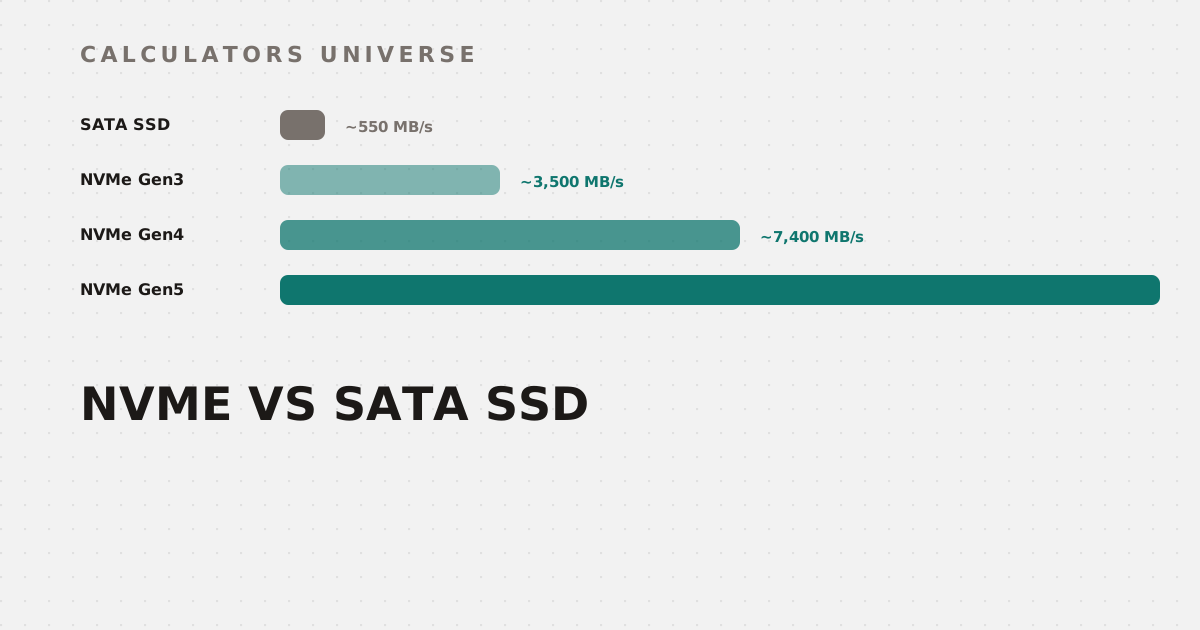
SATA III’s 6Gb/s interface caps out around 550–600MB/s of real usable throughput once encoding overhead is accounted for — a limit essentially every SATA SSD has bumped against for years. Part of that ceiling isn’t even the physical interface: SATA SSDs still communicate through AHCI, a protocol designed back in 2004 for spinning hard drives, with a single command queue only 32 entries deep. AHCI was never built with flash memory’s parallelism in mind, and it becomes its own bottleneck independent of the SATA cable’s raw bandwidth. Compare real NVMe and SATA load times for your own game sizes with the NVMe vs SATA SSD Load Time Calculator.
NVMe: Bypassing the Bottleneck Entirely
NVMe was designed specifically to eliminate that bottleneck — it connects storage directly over PCIe lanes, skipping AHCI’s legacy queue limitations entirely. Real-world throughput scales with PCIe generation: roughly 3,000–3,500MB/s on PCIe Gen3 x4, up to ~7,400MB/s on Gen4 x4, and up to ~14,000MB/s on Gen5 x4.
This is the number on the spec sheet — real game loading tells a very different story
Check exactly how much bandwidth your specific PCIe generation and lane count deliver — and whether a narrower slot could bottleneck a fast drive — with the PCIe Bandwidth Calculator.
The Real-World Surprise: Load Times Barely Move
Here’s where the spec sheet and reality diverge. Independent benchmark testing repeatedly shows the gap between SATA and NVMe game load times landing at just 1–2 seconds in most traditional titles — an 11-second SATA load becoming a 10-second NVMe load, or a 20-second load dropping to 18. In The Last of Us Part II, testing found no meaningful difference between NVMe drives of different generations at all. The exception is games specifically built around DirectStorage and heavy open-world asset streaming: Kingdom Come: Deliverance II showed the fastest PCIe 5.0 drive loading about 15% faster than the slowest PCIe 3.0 drive — roughly five real seconds saved.
Loading is gated by CPU decompression and random access, not raw sequential throughput, in most games
The reason: most game loading isn’t actually sequential-bandwidth-bound at all — it’s limited by CPU decompression and random small-file access patterns, which neither SATA nor NVMe fixes on its own. Model your own expected load time gap by game size and drive with the NVMe vs SATA SSD Load Time Calculator.
Is Gen 5 Worth the Premium Over Gen 4?
Given how small the everyday gap can be, the Gen 4 vs Gen 5 decision usually comes down to workload rather than gaming alone — large file transfers, video editing, and AI dataset work can genuinely benefit from Gen 5’s extra bandwidth even when gaming barely notices it. Compare the real cost per hour saved across workloads with the PCIe Gen 5 NVMe Worth It Calculator.
Don’t Forget Lifespan and Real Capacity
Speed aside, two other numbers matter just as much when choosing a drive. Check how many years of realistic use remain based on your daily write volume and the drive’s TBW rating with the SSD Lifespan Estimator. And when your new 1TB drive shows up as roughly 931GB in Windows, that’s not missing storage — it’s the gap between decimal GB (1,000³ bytes, what manufacturers advertise) and binary GiB (1,024³ bytes, what your OS actually displays, often mislabeled “GB”). Convert between the two correctly with the Storage Converter & Calculator or File Size Converter.
Frequently Asked Questions
Is NVMe really that much faster than SATA in real use?
In raw sequential benchmarks, yes — often 6x to over 25x. In actual game load times, the difference is usually just 1–2 seconds, because loading is typically bottlenecked by CPU decompression and random access rather than sequential bandwidth.
Why doesn’t my new NVMe drive load games noticeably faster than my old SATA SSD?
Because most games aren’t sequential-bandwidth-bound during loading — the CPU decompressing assets and handling random small-file reads is usually the actual limiting factor, which a faster drive interface alone doesn’t fix.
What’s the difference between SATA/AHCI and NVMe?
AHCI is a 2004-era protocol designed for hard drives with a shallow single command queue; NVMe connects storage directly over PCIe and was built specifically to remove that legacy bottleneck for flash memory.
Why does my 1TB drive show up as 931GB?
Manufacturers advertise capacity in decimal gigabytes (1,000³ bytes), while your operating system displays binary gibibytes (1,024³ bytes) but often mislabels them “GB” — the drive isn’t missing space, the units are just different.
Is PCIe Gen 5 worth it for gaming right now?
For most current games, the real-world gain over Gen 4 is small; it matters more for large file transfers, video editing, and data-heavy workloads where sustained bandwidth genuinely gets used.
Related Calculators
Start with the NVMe vs SATA SSD Load Time Calculator to model your own real-world gap, check available bandwidth with the PCIe Bandwidth Calculator, and weigh the Gen 5 premium with the PCIe Gen 5 NVMe Worth It Calculator. Round out your storage decision with the SSD Lifespan Estimator, Storage Converter & Calculator, and File Size Converter.
External Resources
- PCI-SIG — the official organization behind the PCIe standard used by all modern NVMe drives
- NVM Express — Wikipedia — background on the NVMe protocol and its design goals versus AHCI