How Much Electricity Does Your Gaming PC Really Use?
A data-driven breakdown of gaming PC power consumption — from TDP to real monthly costs — and the simple tricks that cut your electricity bill without sacrificing performance.
The Hidden Bill Behind Your Gaming Setup
You budgeted for the GPU. You budgeted for the monitor. But did you budget for the electricity? A high-end gaming PC running an NVIDIA RTX 4090 and an Intel Core i9-14900K can pull over 640 watts under full gaming load. At the US average residential rate of $0.17/kWh, that is roughly $170–$200 per year in electricity — just for one machine, before you add monitors, peripherals, or a router.
This guide breaks down exactly where that power goes, which hardware tier costs the most, and what you can do about it.
What is TDP and Why Does it Matter?
Thermal Design Power (TDP) is the maximum heat a component is rated to generate under sustained load. While it is not a direct measurement of power draw, it is the most accurate proxy available for estimating electricity consumption. Manufacturers like NVIDIA and AMD publish official TDP figures for every GPU, and we use these as the foundation of our calculations.
Important: TDP represents sustained load, not instantaneous spikes. A real gaming session typically runs at 75–85% of TDP — which is why our calculator uses 80% as the gaming load multiplier.
GPU Power Consumption by Tier
The GPU is the single largest consumer of power in any gaming rig, often accounting for 60–70% of the total system draw. Here is how the current GPU generation stacks up at peak load.
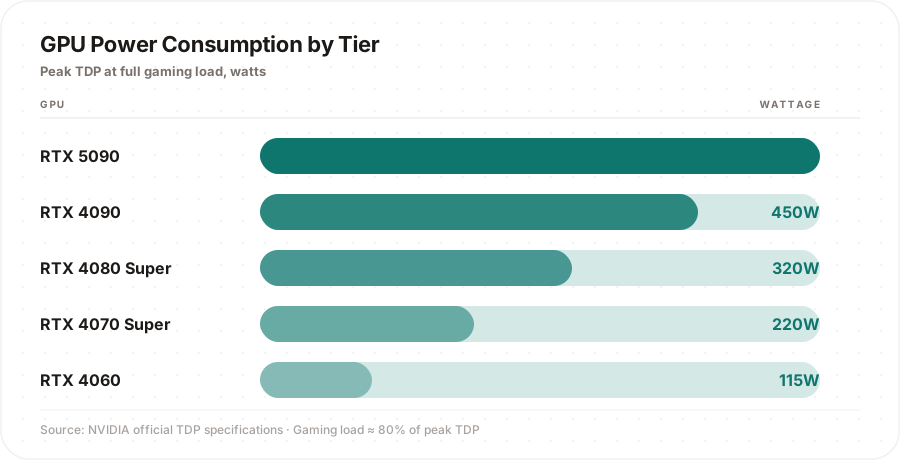
The gap between tiers is striking. The RTX 5090 consumes 5× more power than the RTX 4060 — yet it sits in the same slot on your motherboard and to most users looks identical under load.
Real Monthly Costs by GPU
Using 4 hours of gaming per day and the US average electricity rate of $0.17/kWh, here is what the GPU portion of your bill looks like across tiers. These figures isolate the GPU only — add roughly $3–5/month for CPU, motherboard, RAM, and storage.
| GPU | TDP | Gaming Draw (80%) | Monthly Cost (GPU only)* |
|---|---|---|---|
| NVIDIA RTX 5090 | 575W | 460W | ~$9.38 |
| NVIDIA RTX 4090 | 450W | 360W | ~$7.34 |
| NVIDIA RTX 4080 Super | 320W | 256W | ~$5.22 |
| NVIDIA RTX 4070 Super | 220W | 176W | ~$3.59 |
| AMD RX 7900 XTX | 355W | 284W | ~$5.79 |
| AMD RX 7800 XT | 263W | 210W | ~$4.30 |
| NVIDIA RTX 4060 | 115W | 92W | ~$1.88 |
*4h gaming/day · $0.17/kWh · 30 days · 80% load factor
Key takeaway: Upgrading from an RTX 4060 to an RTX 4090 will cost you roughly $65 more per year in electricity alone. Over a typical 4-year GPU lifespan, that is $260 in electricity before you factor in the higher purchase price.
The Idle Trap: Your PC Is Bleeding Money 24/7
This is the part most guides ignore. Even when you are not gaming, a high-end PC left running at desktop idle still draws significant power:
- CPU at idle: approximately 5% of TDP
- GPU at idle: approximately 8% of TDP
- Base system (motherboard, RAM, storage, fans): approximately 30W
A system with an RTX 4090 + Intel i9-14900K at idle draws roughly 110–130 watts. Leave it running 20 hours a day (16h idle, 4h gaming) and idle consumption can account for 30–40% of your total annual electricity cost.
The fix is simple: enable sleep mode after 15 minutes of inactivity. Most users never do this.
How Efficiency Ratings Change the Equation
Not all watts drawn from the wall reach your components. Your PSU converts AC power from the wall to DC power for your parts — and loses some in the process as heat. The 80 Plus certification grades PSUs by this efficiency:
| 80 Plus Rating | Efficiency at 50% Load | Wasted Power (600W system) |
|---|---|---|
| Bronze | ~85% | ~106W wasted |
| Gold | ~90% | ~67W wasted |
| Platinum | ~92% | ~52W wasted |
| Titanium | ~94% | ~38W wasted |
A Gold-rated PSU over a Titanium might seem like a minor difference — but at 4 hours/day over 4 years, that 4% efficiency gap represents roughly 25–35 kWh of extra electricity annually. Use our PSU Calculator to check whether your current PSU is the right size for your build.
3 Changes That Actually Lower Your Bill
1. Cap your frame rate. Running at 300 FPS in a game your monitor can only display at 165 Hz wastes energy. Use our FPS Predictor to find your monitor’s target frame rate, then cap it in your GPU control panel. This is the single highest-impact change available.
2. Enable your GPU’s efficiency mode. NVIDIA GPUs from the RTX 3000 series onwards include a “quiet” or “eco” BIOS switch accessible via the physical dual-BIOS button or software. AMD has equivalent power-limit sliders in Radeon Software. Reducing the GPU power limit by 20% typically costs less than 5% in frame rate.
3. Turn off the PC, not just the screen. Sleep mode uses under 5W. Running at idle uses 80–130W. If you are stepping away for more than an hour, sleep mode is the right choice.
Want to see the exact numbers for your specific hardware? Run your build through our Gaming Electricity Cost Calculator — it accounts for your CPU, GPU, monitor count, gaming hours, and local electricity rate to give you a precise daily, monthly, and yearly cost breakdown. You can also explore the environmental angle with our Carbon Footprint Calculator and see how much you could recover with our Eco Mode Savings Calculator.
TDP figures sourced from official NVIDIA and AMD product specification pages. US average electricity rate based on the US Energy Information Administration (EIA) residential data for 2024.