DDR4 vs DDR5: Is the RAM Upgrade Actually Worth It?
A DDR5-6000 kit and a DDR4-3200 kit can have the exact same 10ns real-world latency. The MT/s number alone tells you almost nothing — here's the real math.
DDR4 vs DDR5: Is the RAM Upgrade Actually Worth It?
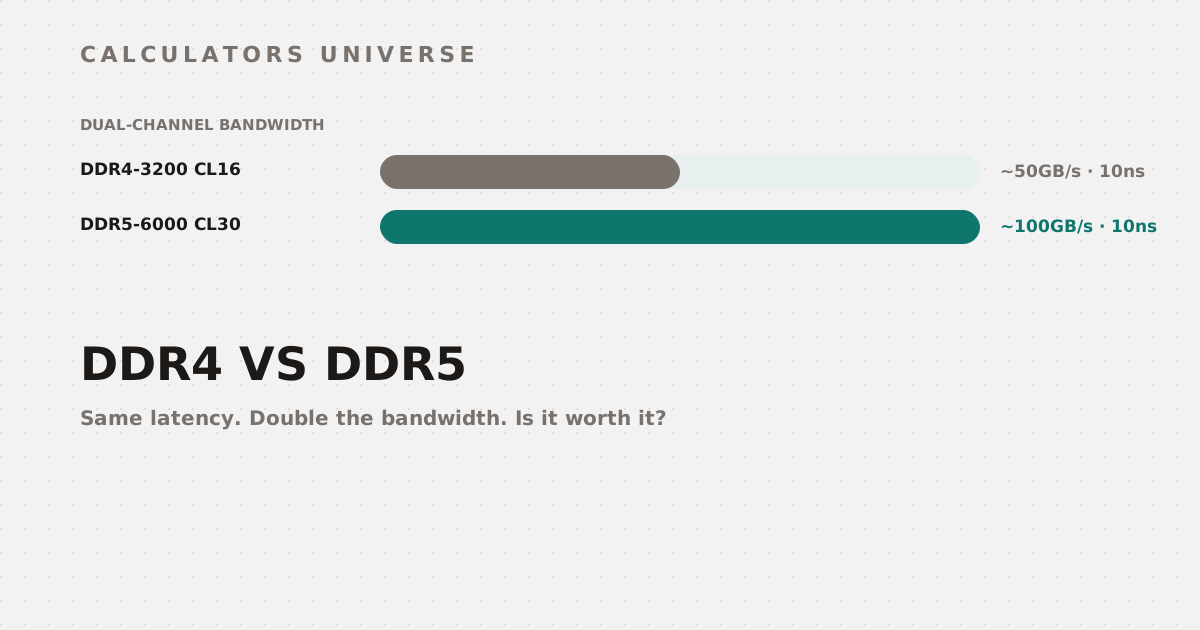
Here’s a fact that surprises most people shopping for RAM: a DDR5-6000 CL30 kit and a DDR4-3200 CL16 kit have the exact same 10 nanosecond real-world latency. The MT/s number stamped on the box tells you almost nothing about actual speed on its own — the real math is more specific, and more interesting.
The Real Latency Formula: Why MT/s and CL Alone Don’t Tell You Anything
RAM speed marketing leads with two numbers — MT/s (transfer rate) and CL (CAS latency, in clock cycles) — but neither means anything until you convert them into an actual time delay: Latency (ns) = (CL × 2000) / MT/s.
Higher MT/s with a proportionally higher CL can lose to a lower-MT/s kit — nanoseconds are the only fair comparison
Run this exact comparison on any two kits you’re deciding between with the RAM CAS Latency Calculator.
DDR4 vs DDR5: What Actually Changed
Standard DDR4 tops out around 3200 MT/s at JEDEC spec, with typical CAS latencies of CL14–22 — producing roughly 10ns of real latency at DDR4-3200 CL16. DDR5 starts where DDR4 topped out: a 4800 MT/s JEDEC baseline, scaling to 6400 MT/s and beyond in mainstream kits, but with correspondingly higher CL values (32–40+). The net effect: a well-tuned DDR5-6000 CL30 kit lands at the identical 10ns real latency as DDR4-3200 CL16 — DDR5’s actual win isn’t lower latency, it’s roughly double the bandwidth at the same real access time (about 100GB/s dual-channel vs. DDR4’s ~50GB/s). Get the full cost-vs-performance picture — including motherboard cost and DDR4 resale value — with the DDR4 vs DDR5 Upgrade Calculator.
The Setting Most People Forget: XMP and EXPO
Here’s the part that catches even experienced builders: RAM boots at a conservative JEDEC default speed — 2133 MT/s for DDR4, 4800 MT/s for DDR5 — regardless of what speed you paid for, until you manually enable an overclock profile in BIOS. Intel platforms call this XMP; AMD platforms call it EXPO. Both are manufacturer-tested profiles stored on the RAM’s own SPD chip, activating the kit’s actual rated speed, voltage, and timings in one BIOS toggle. AMD’s own testing shows EXPO-enabled DDR5 delivering up to 11% higher frame rates at 1080p compared to leaving it at JEDEC defaults — a real, measurable difference from a setting many builds never touch. Calculate your exact expected gain with the XMP / EXPO RAM Performance Gain Calculator.
Single vs Dual Channel: The Other Setting That Matters
Beyond speed, how your sticks are installed matters just as much: two sticks running in dual-channel mode (e.g., 2×16GB) provide roughly double the memory bandwidth of a single stick of equivalent total capacity (1×32GB) — populating channels correctly is effectively free bandwidth. See exactly how much FPS is at stake for your specific CPU and GPU with the Single vs Dual Channel RAM FPS Calculator.
How Much RAM (Capacity) Do You Actually Need?
Speed and capacity are two entirely separate decisions. If your current bottleneck is running out of memory rather than bandwidth, no amount of DDR5 speed will help — get a workload-based recommendation with the How Much RAM Do I Need? Calculator, or check whether your existing 16GB or 32GB kit is actually enough for what you run with the RAM Capacity Checker.
Frequently Asked Questions
Does higher MT/s always mean faster RAM?
No — MT/s only tells part of the story. A higher-MT/s kit with a proportionally higher CAS latency can produce a longer real-world delay in nanoseconds than a lower-MT/s kit with a tighter CL.
What’s the difference between CL and real latency?
CL (CAS latency) is measured in clock cycles, not time — converting it to nanoseconds using the transfer rate is the only way to compare latency fairly across different RAM speeds.
Why does my RAM show a lower speed than I paid for?
Almost certainly because XMP or EXPO isn’t enabled — RAM boots at the conservative JEDEC default speed until you manually turn on the overclock profile in BIOS.
Is DDR5 actually faster than DDR4?
Its real advantage is bandwidth, not latency — a mainstream DDR5 kit can match DDR4’s real-world latency in nanoseconds while delivering roughly double the data throughput.
Does dual-channel RAM configuration really matter?
Yes — running two sticks in dual-channel mode roughly doubles memory bandwidth compared to a single stick of the same total capacity, which can measurably affect gaming and productivity performance.
Related Calculators
Start with the RAM CAS Latency Calculator to compare any two kits fairly, then evaluate the full upgrade with the DDR4 vs DDR5 Upgrade Calculator. Make sure you’re actually getting your kit’s rated speed with the XMP / EXPO RAM Performance Gain Calculator, check your channel configuration with the Single vs Dual Channel RAM FPS Calculator, and confirm capacity separately with the How Much RAM Do I Need? Calculator and RAM Capacity Checker.
External Resources
- JEDEC — the official memory standards body defining base DDR4/DDR5 specifications
- CAS latency — Wikipedia — background on CAS latency and its relationship to real access time