AIO vs Air Cooler: The Real Thermal Math Behind CPU Cooling
A 240mm AIO barely beats a good air cooler in gaming. The real gap only opens above ~200W of sustained heat — where a 360mm AIO runs 8-15°C cooler. Here's why.
AIO vs Air Cooler: The Real Thermal Math Behind CPU Cooling
A 240mm AIO liquid cooler and a genuinely good dual-tower air cooler perform almost identically in most gaming workloads. The real gap only opens up under sustained heavy load — rendering, video encoding, prolonged AVX-heavy work — and when it does, it’s a real, measurable difference driven by physics, not marketing.
Why Liquid Has an Edge: Thermal Mass and Buffering
Water’s high specific heat capacity lets a liquid loop absorb a large burst of heat energy during a sudden jump from idle to full load without a dangerous temperature spike — the coolant buffers the transient while the radiator catches up. Air coolers absorb spikes into their fin array’s thermal mass instead, which works, but with far less buffering capacity. On top of that, a 360mm radiator simply has substantially more total fin surface area than even the largest dual-tower air coolers, meaning it can reject more heat per unit time at the same fan speed. Get a clear recommendation for your specific CPU, case, noise tolerance, and budget with the AIO vs Air Cooler Calculator.
The Real Numbers: When the Gap Actually Shows Up
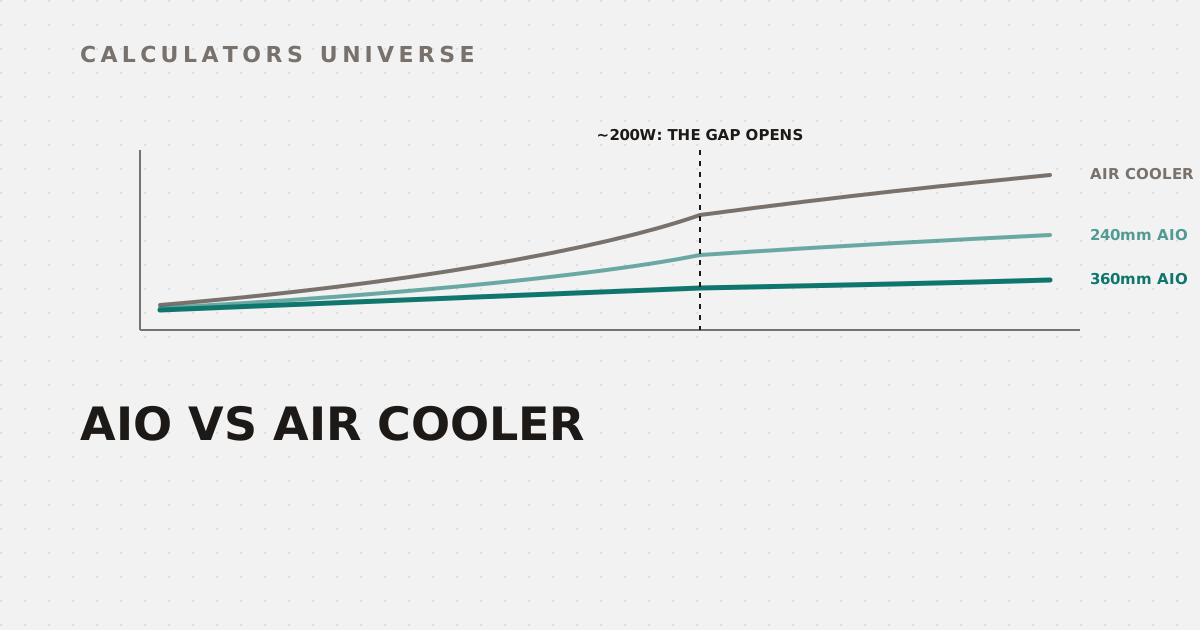
All three track closely under light load — the gap opens specifically past ~200W of sustained heat
Independent testing shows top-tier dual-tower air coolers comfortably handling roughly 170W with margin, but starting to throttle slightly above 200W under prolonged, AVX-heavy sustained load — exactly where a 360mm AIO keeps handling that same heat comfortably. In direct testing under heavy sustained workloads like Cinebench R23 and video encoding, 360mm AIOs have run 8–15°C cooler than dual-tower air coolers. Notably, 240mm AIOs don’t show that same advantage — their radiator surface area isn’t large enough to create a meaningful gap, landing much closer to a high-end air cooler’s performance, especially in gaming workloads that rarely sustain 100% CPU load the way rendering does. Check your exact combined CPU and GPU heat output with the CPU & GPU Cooling TDP Calculator, or size a full custom loop’s radiator and pump for your real TDP with the Custom Water Cooling Loop Calculator.
Is 95°C Actually a Problem? Understanding TJ Max
Seeing your CPU hit 95°C under load can look alarming, but it depends entirely on your chip’s TJ Max (thermal junction maximum) — the temperature at which automatic thermal throttling kicks in to protect the silicon. Intel CPUs typically allow up to around 100°C; AMD Ryzen CPUs typically target 95°C. Here’s the reassuring part: modern Intel 13th/14th-gen and AMD Ryzen 7000-series-and-newer chips are specifically designed to push toward 95°C under sustained load as part of their normal boost algorithm — that’s expected behavior, not a cooling failure. Check whether your specific CPU or GPU is actually throttling, with a clear Safe/Warning/Danger verdict, using the Thermal Throttling Temperature Calculator.
Airflow Direction Matters as Much as the Cooler Itself
Cooling performance isn’t only about the CPU cooler — case airflow direction changes both temperatures and long-term dust buildup.
Positive pressure only prevents dust if intake fans actually have filters
With positive pressure (more intake CFM than exhaust), dust can’t enter through unfiltered gaps because air is constantly rushing outward — but only if your intake fans actually have dust filters. With negative pressure, air (and dust) gets pulled in through every unfiltered crack, PCIe slot, and side panel gap instead. The safest general-purpose configuration is neutral to slightly positive pressure — enough to reduce dust buildup without trapping hot air inside from too much intake versus exhaust. Check your own intake-vs-exhaust CFM balance with the PC Case Fan Airflow Calculator.
How Far Can You Push It? Overclocking Headroom
Once your cooling solution is confirmed adequate, the safe overclocking ceiling is a direct function of that cooler’s real thermal capacity. Get a recommended MHz offset and thermal risk tier based on your specific CPU and cooler with the CPU Overclocking Headroom Estimator.
Frequently Asked Questions
Is an AIO always better than an air cooler?
Not for most users — a good air cooler matches or nearly matches a 240mm AIO in typical gaming workloads. The AIO’s real advantage only shows up under sustained heavy load above roughly 200W, like rendering or prolonged AVX-heavy workstation tasks.
At what heat load does an AIO actually pull ahead?
Around 200W of sustained heat — below that, a quality air cooler performs comparably; above it, a 360mm AIO has measurably run 8–15°C cooler in testing, while 240mm AIOs show much less of an advantage.
Is 95°C dangerous for my CPU?
Not necessarily — modern Intel and AMD Ryzen CPUs are specifically designed to boost toward temperatures near their TJ Max (around 95–100°C) under sustained load. What matters is whether you’re actually thermal throttling, not the raw number alone.
What’s the difference between positive and negative case pressure?
Positive pressure (more intake than exhaust) pushes dust out through gaps instead of pulling it in, but only works with filtered intake fans; negative pressure pulls unfiltered air and dust in through every crack in the case.
Do I need a 360mm AIO for gaming?
Usually not — gaming rarely sustains the kind of 100%, all-core heavy load where a 360mm AIO’s advantage becomes measurable; a 240mm AIO or a good air cooler is typically sufficient.
Related Calculators
Start with the AIO vs Air Cooler Calculator for a direct recommendation, check your real heat output with the CPU & GPU Cooling TDP Calculator, and confirm you’re not throttling with the Thermal Throttling Temperature Calculator. Balance your case airflow with the PC Case Fan Airflow Calculator, size a full custom loop with the Custom Water Cooling Loop Calculator, and find your safe overclock ceiling with the CPU Overclocking Headroom Estimator.
External Resources
- Liquid vs air cooling: Do you need an AIO cooler? — Tom’s Hardware — detailed independent testing and analysis
- Computer cooling — Wikipedia — background on cooling methods and thermal design principles