144Hz vs 240Hz vs 360Hz: Does Your Eye (and Your GPU) Actually Notice the Difference?
60Hz to 144Hz saves 9.8ms per frame. 240Hz to 360Hz saves just 1.4ms. The returns shrink fast — and a slow panel can quietly cancel out the Hz you paid for.
144Hz vs 240Hz vs 360Hz: Do You Actually Notice the Difference?
Going from 60Hz to 144Hz cuts nearly 10 milliseconds off every frame’s display time. Going from 240Hz to 360Hz saves barely 1.4 milliseconds. Both upgrades cost real money — only one of them delivers a difference most people can reliably feel.
The Math: What Refresh Rate Actually Buys You
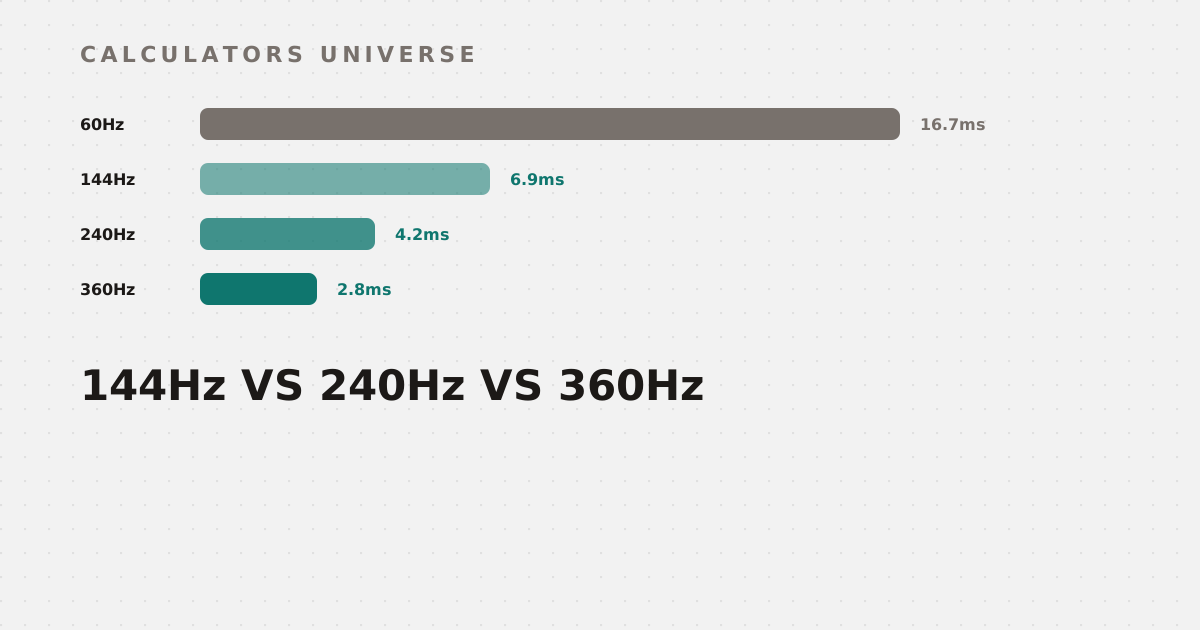
Frame time — how long each frame stays on screen — is simply 1000 ÷ Hz. At 60Hz that’s 16.7ms; at 144Hz, 6.9ms; at 240Hz, 4.2ms; at 360Hz, 2.8ms.
Each step up buys a smaller absolute improvement than the last
The pattern is stark: 60→144Hz saves 9.8ms per frame; 144→240Hz saves only 2.7ms; 240→360Hz saves just 1.4ms. Every jump costs proportionally more money for a shrinking absolute return. Check whether your GPU can actually sustain a given refresh rate in your specific games with the Monitor Hz vs FPS Match Calculator.
Can You Actually Perceive It?
Testing bears out the math: participants can reliably tell 60Hz from 360Hz apart, but distinguishing 144Hz from 360Hz directly is noticeably harder — the absolute jump matters more than raw Hz numbers. A commonly cited rule of thumb: because returns diminish, doubling your refresh rate with each upgrade (60→144→360) actually captures more real, perceivable improvement than smaller incremental jumps like 60→144→240. For most players, 240Hz already delivers excellent smoothness; the push to 360Hz mainly pays off in competitive esports, where every remaining millisecond genuinely matters. None of this matters, though, if your hardware can’t sustain the frame rate to begin with — estimate your real FPS with the GPU FPS Estimator, and check whether your CPU or GPU is actually the limiting factor with the CPU & GPU Bottleneck Calculator.
The Part Everyone Forgets: Response Time Has to Keep Up
A high refresh rate is wasted if the panel’s pixels physically can’t keep pace with it. At 360Hz, each frame is only displayed for 2.8ms — if the monitor’s response time (gray-to-gray transition speed) is slower than that window, the pixel is still mid-transition when the next frame arrives, producing visible ghosting or motion trailing that partially cancels out the higher Hz you paid for.
The same 4ms panel fits comfortably at 144Hz but overruns the frame window at 360Hz
Manufacturers try to fix this with overdrive — extra voltage that speeds up pixel transitions — but overdrive tuned too aggressively overshoots the target color entirely, producing inverse ghosting: bright halos trailing moving objects, a different but equally visible artifact. Run the physics-based math on ghost frames for your specific response time and refresh rate — including an overdrive tuning guide — with the Monitor Response Time & Ghosting Calculator.
Picking the Right Monitor for Your Actual Setup
A refresh rate number alone doesn’t tell you what to buy — it needs to match your GPU, the games you actually play, and your budget. Get a personalized resolution, refresh rate, and panel type recommendation with the Gaming Monitor Buying Advisor. And since hitting a high refresh rate often means leaning on upscaling, check the real internal render resolution behind DLSS, FSR, or dynamic resolution scaling with the Resolution Scaling & Supersampling Calculator.
Frequently Asked Questions
Can the human eye actually see above 60fps?
Yes — this is a persistent myth. Human vision doesn’t have a fixed frame rate, and testing consistently shows people can reliably perceive differences well beyond 60Hz, especially in fast motion, though the perceptual gain per step shrinks at higher refresh rates.
What’s the real difference between 240Hz and 360Hz?
Mathematically, just 1.4ms of frame time — a real but small difference that’s harder to perceive directly than a bigger jump like 60Hz to 240Hz, and matters most in competitive esports rather than general gaming.
Why does my high refresh rate monitor still look blurry in motion?
Likely a response time mismatch — if your panel’s pixel transition speed is slower than the time each frame is displayed, you get visible ghosting that undercuts the benefit of the higher refresh rate.
What is monitor overdrive, and should I max it out?
Overdrive boosts voltage to speed up pixel transitions and reduce ghosting, but pushing it too far causes overshoot (“inverse ghosting”) — bright trailing halos — so it should be tuned to your specific panel and refresh rate, not maxed by default.
Do I need a 360Hz monitor for gaming?
For most players, no — 240Hz already delivers excellent smoothness with far better value; 360Hz mainly benefits competitive/esports players where the remaining milliseconds genuinely affect performance.
Related Calculators
Start with the Monitor Hz vs FPS Match Calculator to check what your GPU can sustain, and the GPU FPS Estimator and CPU & GPU Bottleneck Calculator to confirm your hardware can actually hit it. Check for ghosting with the Monitor Response Time & Ghosting Calculator, get a personalized pick from the Gaming Monitor Buying Advisor, and understand upscaling’s role with the Resolution Scaling & Supersampling Calculator.
External Resources
- Blur Busters — the leading independent authority on display motion, refresh rate, and ghosting testing
- Refresh rate — Wikipedia — background on refresh rate, frame rate, and their relationship in real-time rendering